MQTT Application v1.1
Application configuration
url: mqtts://test.mosquitto.org:8883
eui: filter end-devices joined to AppNet EUI
encodeHex: encode payloads to and from hex instead of default base64
options:
  check_hostname: enable hostname check for tls connection
  client_id: client id
  server_cert: server certificate
  client_cert: client certicate
  apikey: client private key
  username: MQTT username
  password: MQTT password
  uplinkTopic: override topic for uplinks to publish to
  downlinkTopic: override topic to subscribe to for downlinks
  overrideTopicsForAllApps: use custom topics for all apps
requestOptions:
  api: enable api requests
  log: enable log requests
  lora: enable lora query requests
backhaulDetect:
  enabled: turn backhaul detect messages on/off
  payload: hex payload of downlink packet to send to end-device when backhaul is down
  port: port to send downlink packet to end-device
  timeout: scheduling timeout limit the number of downlinks scheduled, default one per 5 minutes
AWS or MQTT Broker
AWS provides configuration for MQTT connections and topic based security and routing. The following MQTT topics can be configured in AWS policies. TLS Certificates and Keys are used to authenticate the AWS connection.
MQTT Protocol v1.1
Overview
- Gateaway Publish
- lorawan/<GW-UUID>/init
- lorawan/<GW-UUID>/close
- lorawan/<GW-UUID>/disconnect
- lorawan/<GW-UUID>/<APP-EUI>/<DEV-EUI>/up
- lorawan/<GW-UUID>/<APP-EUI>/<DEV-EUI>/joined
- lorawan/<GW-UUID>/<APP-EUI>/<DEV-EUI>/moved
- lorawan/<GW-UUID>/api_res
- lorawan/<GW-UUID>/lora_res
- lorawan/<GW-UUID>/log_res
- Gateway Subscribe
- lorawan/<GW-UUID>/down
- lorawan/<GW-UUID>/api_req
- lorawan/<GW-UUID>/lora_req
- lorawan/<GW-UUID>/log_req
Gateway Publishes
-
lorawan/<GW-UUID>/init
Published when the application starts
lorawan/029998e0-6156-cdd4-4523-264b523115c1/init{ "gateways_euis": ["00-80-00-00-d0-00-01-1a", "00-80-00-00-d0-00-01-ff"], "time": "2023-03-04T23:08:26.021832Z", "api_version": "1.1" } -
lorawan/<GW-UUID>/close
Published when the application stops
lorawan/029998e0-6156-cdd4-4523-264b523115c1/close (null) -
lorawan/<GW-UUID>/disconnected
Published when the application disconnects unexpectedly, using MQTT will
lorawan/029998e0-6156-cdd4-4523-264b523115c1/disconnected (null) -
lorawan/<GW-UUID>/<APP-EUI>/<DEV-EUI>/up
Published on uplink from end-device
lorawan/029998e0-6156-cdd4-4523-264b523115c1/8b-6c-f0-8e-ee-df-1b-b6/00-80-00-ff-ff-00-00-03/up -
lorawan/<GW-UUID>/<APP-EUI>/<DEV-EUI>/joined
Published on valid join request from end-device
lorawan/029998e0-6156-cdd4-4523-264b523115c1/8b-6c-f0-8e-ee-df-1b-b6/00-80-00-ff-ff-00-00-03/joined -
lorawan/<GW-UUID>/api_res
Published as response to api_req request
lorawan/029998e0-6156-cdd4-4523-264b523115c1/api_res -
lorawan/<GW-UUID>/lora_res
Published as response to lora_req request
lorawan/029998e0-6156-cdd4-4523-264b523115c1/lora_res -
lorawan/<GW-UUID>/log_res
Published as response to log_req request
lorawan/029998e0-6156-cdd4-4523-264b523115c1/log_res
Gateway Subscribes
-
lorawan/<GW-UUID>/down
Send a downlink packet to the gateway for a known end-device
lorawan/029998e0-6156-cdd4-4523-264b523115c1/down { "deveui": "Device EUI to queue downlink", "data":"BASE64 payload to send" } -
lorawan/<GW-UUID>/api_req
Make an API call to a gateway
lorawan/029998e0-6156-cdd4-4523-264b523115c1/api_req { "method": "GET, POST, PUT or DELETE", "path": "API path to request", "body": "JSON data to send to API" "rid": Number or string value to correlate request to response } -
lorawan/<GW-UUID>/lora_req
Make a lora-query to a gateway
lorawan/029998e0-6156-cdd4-4523-264b523115c1/lora_req { "command":"COMMAND STRING TO SEND TO LNS", "rid": Number or string value to correlate request to response } -
lorawan/<GW-UUID>/log_req
Request a log entry from a gateway
lorawan/029998e0-6156-cdd4-4523-264b523115c1/log_req
{
  "file":"FILE IN /var/log/ TO READ",
  "lines": Number of lines to read from the log,
  "rid": Number or string value to correlate request to response
}
MQTT Protocol v1.1.1
API Version 1.1.1 supports all 1.1 functionality plus the additional messages below.
- Gateaway Publish
- lorawan/<GW-UUID>/connected
- Gateway Subscribe
- lorawan/<GW-UUID>/clear
Gateway Publishes
-
lorawan/<GW-UUID>/connected
Published when the application connects or reconnects
Gateway Subscribes
-
lorawan/<GW-UUID>/clear
Clear the downlink queue of a gateway for a known end-device
lorawan/029998e0-6156-cdd4-4523-264b523115c1/clear
{
  "deveui": "Device EUI queue to clear"
}
Topics to request gateway info
Request ID
The “rid” field can be added to app-connnect lora_query, api_query and log_query requests and will be added to the response json to correlate the response to the request message in releases after mPower 6.3.0.
LoRa Query
- lorawan/<GW-UUID>/lora_req - send request for lora-query utility
- Multitech LNS LoRa Query
- command - lora-query command to run
- Example: retrieve count of device records
$ mosquitto_pub -t lorawan/029998e0-6156-cdd4-4523-264b523115c1/lora_req -m '{"command":"device count","rid":1}'- response
lorawan/029998e0-6156-cdd4-4523-264b523115c1/lora_res{ "rid": 1, "result": { "count" : 9 } } - Example: queue a downlink
$ mosquitto_pub -t lorawan/8ffa106f-c751-cfcd-6300-80918d516837/lora_req -m $'{"command": "packet queue add \'{\\\"deveui\\\":\\\"00-80-00-ff-00-00-00-03\\\",\\\"data\\\": \\\"QA==\\\"}\'", "rid": 4}' - response
lorawan/029998e0-6156-cdd4-4523-264b523115c1/lora_res{ "rid": 4, "result": { "id":470, "status":"success" } } - Example: request pages of up to 500 records
$ mosquitto_pub -t lorawan/029998e0-6156-cdd4-4523-264b523115c1/lora_req -m '{"command":"device list json page 0", "rid":1}' - response
lorawan/029998e0-6156-cdd4-4523-264b523115c1/lora_res{ "rid": 1, "result": [{ "class" : "A", "created_at" : "2022-12-27T19:40:37Z", "deveui" : "00-80-00-00-04-00-59-04", "device_profile_id" : 0, "device_profile_updated_at" : "2022-12-27T19:40:37Z", "firmware_version" : "", "hardware_version" : "", "last_app_nonce" : 9, "last_nonce" : 14, "last_seen" : "", "name" : "", "network_profile_id" : 1, "network_profile_updated_at" : "2022-12-27T19:40:37Z", "product_id" : "", "rejoin_count" : 0, "serial_number" : "", "tags" : "" }] }Log Requests
- lorawan/<GW-UUID>/log_req - send request for log file
- lines - number of lines to returned
- file - name of file to read from /var/log folder, only paths to /var/log are allowed.
- filter - regex string to pass to grep -Ei ‘(REGEX)’ as a filter
$ mosquitto_pub -t lorawan/029998e0-6156-cdd4-4523-264b523115c1/log_req -m '{"file":"/var/log/messages","lines":100,"rid":4}' - response
lorawan/029998e0-6156-cdd4-4523-264b523115c1/log_res{ "rid": 4, "result": "2023-03-05T19:55:56.913366+00:00 mtcdt lora-app-connect: Call setup MQTT App\n2023-03-05T19:55:56.934340+00:00 mtcdt lora-app-connect: Setup MQTT App\n2023-03-05T19:55:57.014137+00:00 mtcdt lora-app-connect: MQTT connect mqtt://172.16.0.222:1883\n2023-03-05T19:55:59.985408+00:00 mtcdt lora-app-connect: Start client\n2023-03-05T19:56:00.039355+00:00 mtcdt lora-app..." }API Requests
API Requests can get or change any configuration settings, restart services or reboot the gateway
- Multitech mPower API
- lorawan/<GW-UUID>/api_req - send request for log file
- method - GET, PUT, POST or DELETE
- path - API path to call
- body - JSON object to pass to the API
$ mosquitto_pub -t lorawan/029998e0-6156-cdd4-4523-264b523115c1/api_req -m '{"method":"GET","path":"/api/loraNetwork","body":"","rid":5}' - response
lorawan/029998e0-6156-cdd4-4523-264b523115c1/api_res{ "rid": 5, "code" : 200, "result" : { "__v" : 1, "addressRange" : { "end" : "FF:FF:FF:FE", … }, … } } - Change LoRa Network Settings
{ "method": "PUT", "path": "/api/loraNetwork/lora", "body": "{\"channelPlan\":\"US915\"}" } - List device credentials including DevEUI and AppKey
{ "method": "GET", "path": "/api/loraNetwork/whitelist/devices", "body": "" } - Create device DevEUI and AppKey record
{ "method": "POST", "path": "/api/loraNetwork/whitelist/devices", "body": "{\"deveui\": \"00800000FFFF0001\",\"appeui\": \"0080000000000017\",\"appkey\": \"00800000FFFF000100800000FFFF0001\",\"class\": \"A\"}" } - Remove device DevEUI and AppKey, provide index or DEVEUI to record to delete
{
  "method": "DELETE",
  "path": "/api/loraNetwork/whitelist/devices/0",
  "body": ""
}
Or
{ "method": "DELETE", "path": "/api/loraNetwork/whitelist/devices/00800000FFFF0001", "body": "" } - Restart LoRa services required after changes to the whitelist, also use save_apply to commit API changes to flash
{
"method":"POST",
"path":"/api/lora/restart",
"body":""
}
{ "method":"POST", "path":"/api/command/save_apply?allowRestart=false", "body":"" } - Create device ABP device record
{ "method": "POST", "path": "/api/lora/devices", "body": "{\"deveui\":\"0080000000000001\",\"name\":\"DOT-915\",\"device_profile_id\":0,\"network_profile_id\":0,\"serial_number\":\"123123\",\"product_id\":\"MDOT-915-NA1\",\"hardware_version\":\"0\",\"firmware_version\":\"4.2.1\"}" } - Create device ABP session record
{ "method": "POST", "path": "/api/lora/sessions", "body": "{\"deveui\":\"0080000000000001\",\"dev_addr\":\"00112233\",\"joineui\":\"0080000000000001\",\"appeui\":\"0080000000000001\",\"net_id\":\"000000\",\"app_senc_key\":\"0123456789abcdef0123456789abcdef\",\"fnwk_sint_key\":\"0123456789abcdef0123456789abcdef\"}" } -
Multicast Session Setup and Downlinking
-
Group setup
  {
    "method":"POST",
    "path":"/api/lora/groups",
    "body":"<SEE-BELOW>"
  }
Group EUI is autoassigned
{"groupname":"my-group","deveuis":["00-80-00-ff-ff-00-00-02","00-80-00-ff-00-00-00-03"]}Custom Group EUI
{"groupname":"group-2","groupeui":"00-11-22-33-11-22-33-44","deveuis":["00-80-00-ff-ff-00-00-02","00-80-00-ff-00-00-00-03"]} -
OTA Multicast Session Setup
  {
    "method":"POST",
    "path":"/api/lora/mcm",
    "body":"<SEE-BELOW>"
  }
JSON body for multicast session setup
  {
    "scheduledTimeSinceUnixEpoch": 1748014851,
    "keep_log": false,
    "ssleep_time": 1000,
    "sleep_time": 1500,
    "multicastMessage": {
        "messagePort": 1,
        "messageFormat": "Hexadecimal",
        "messagePayload": "1221",
        "messagePayloadFile": "",
        "multicastSessionTimeout": 15
    },
    "schedule_filename": "mcm_1748014851_0",
    "setupTimeFromScheduledTime": 0,
    "launchTimeFromSetupTime": 60,
    "browserTimeBias": 0,
    "transmission_type": "Message",
    "multicastDeveui": "00-80-00-87-33-c0-03-e1",
    "endDeviceDeveuis": [
        "00-80-00-ff-ff-00-00-02",
        "00-80-00-ff-00-00-00-03"
    ],
    "schedule_source": "Conduit",
    "fotaFile": "N/A"
}
Listing sessions, the multicast session EUI will appear after the scheduled start time
{
"method": "GET",
"path": "/api/lora/sessions",
"body": ""
}
Schedule additional downlinks using the multicast session EUI
{ "method": "POST", "path": "/api/lora/packets/queue", "body": "{\"deveui\":\"00-80-00-87-33-c0-03-e1\",\"port\":1,\"data\":\"MkQ=\",\"ack_retries\":0,\"rx_wnd\":0,\"ack\":false}" } -
Test brokers
- Mosquitto Test Broker
- Supports TLS1.2 server certificate, client certificate and apikey settings for authentication
- Application configuration
- url: mqtts://test.mosquitto.org:8883
- options:
- server_cert: server certificate
- clent_cert: client certicate
- apikey: client private key
- FLESPI Test Broker
- Supports authentication using username access token for authentication
- Application configuration
- url: mqtt://mqtt.flespi.io
- options:
- username: <FLESPI-TOKEN>
Gateway Settings
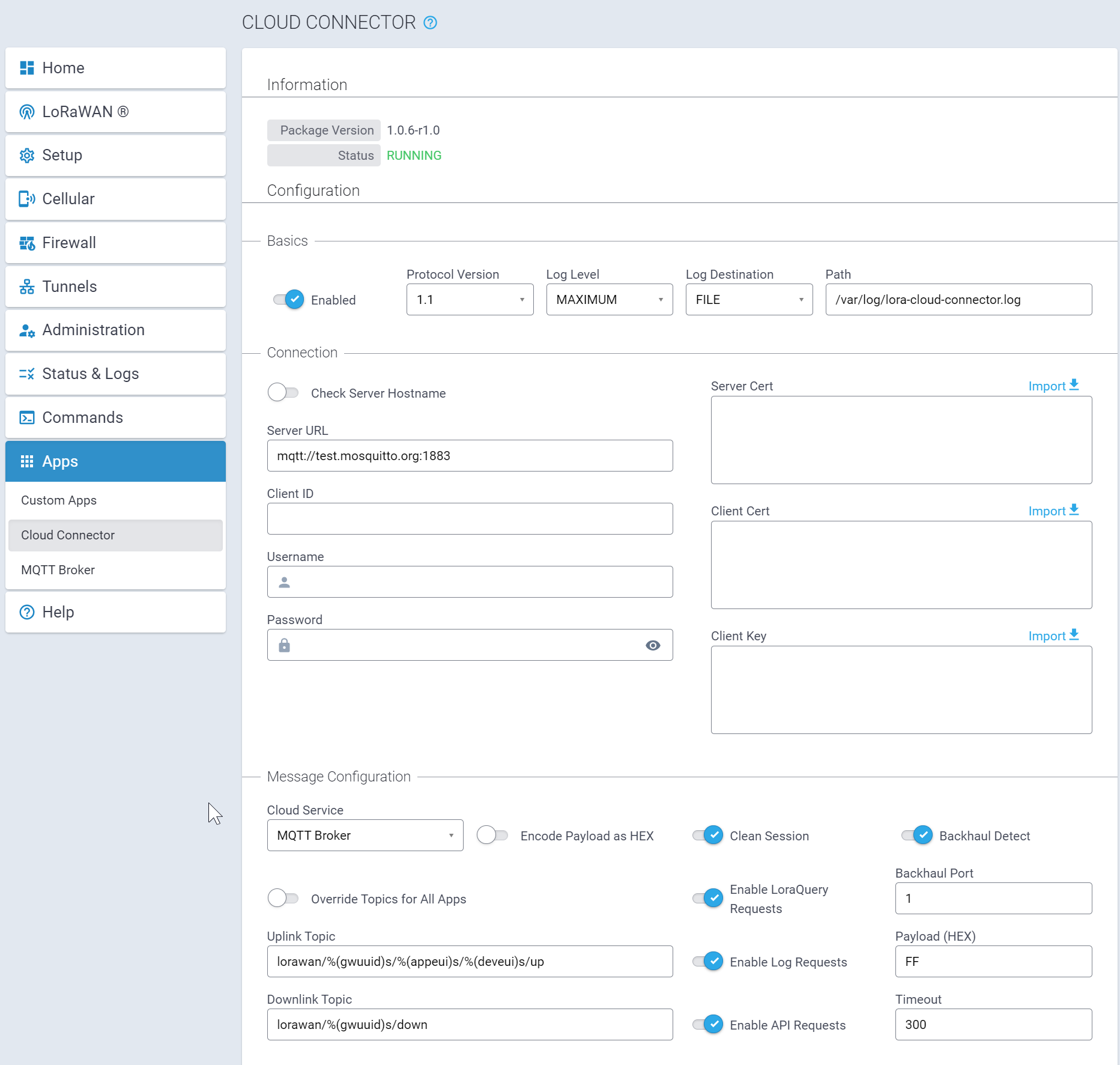
Fields
Enable - enable/disable the local app settings
- Check server hostname - enable checking the certificate hostname for TLS connections
- Server URL - server to connect to using HTTP,HTTPS,MQTT or MQTTS
- App EUI - appeui to filter device uplinks and downlinks
- MQTTS
- Client ID - mqtt client id
- Server Cert - server TLS certificate
- Client Cert - client TLS certificate
- Client Key - client TLS key
- Username - mqtt username
- Password - mqtt password
- Clean Session - start with a clean MQTT session
- Encode Payload as HEX - change payload format from Base64 (default) to HEX string, used for uplink and downlink payloads
- Override Topics for All Apps - apps connections defined by LENS will also use the overriden topic values for publishing uplinks and subscribing for downlinks if enabled
- Enable LoraQuery Requests - allow the server to make lora-query requests through MQTT
- Enable Log Requests - allow the server to make log file requests through MQTT
- Enable API Requests - allow the server to make API requests through MQTT
- Backhaul Detect - enable/disable downlink messages to end-device is the backhaul connection to MQTT is disconnected
- Backhaul Port - port to send downlink messages
- Payload - payload to send downlink messages
- Timeout - timeout to wait before sending another downlink message to the end-device since last backhaul down message
Local Device Key Settings
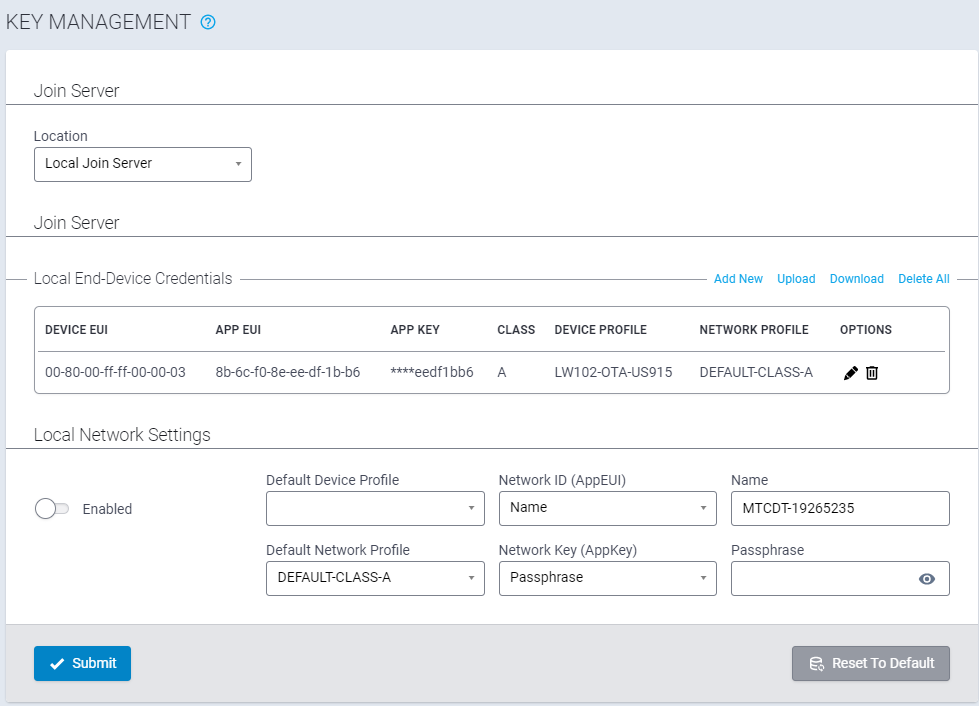
Settings
- DevEUI - End-Device EUI
- AppEUI - AppEUI to assign device record on Join
- AppKey - AppKey of end-device to authenticate join and create session keys
- Device Profile - Default settings to assign device on join
- Network Profile - Class and RF settings to use for device session, MAC commands are sent to update the end-device